
HousesDecorate
AI‑powered room & facade makeovers from a single photo, try free
| Added on: | Jun 6, 2026 |
| Monthly Visits: | -- |
| Social & Email: | -- |

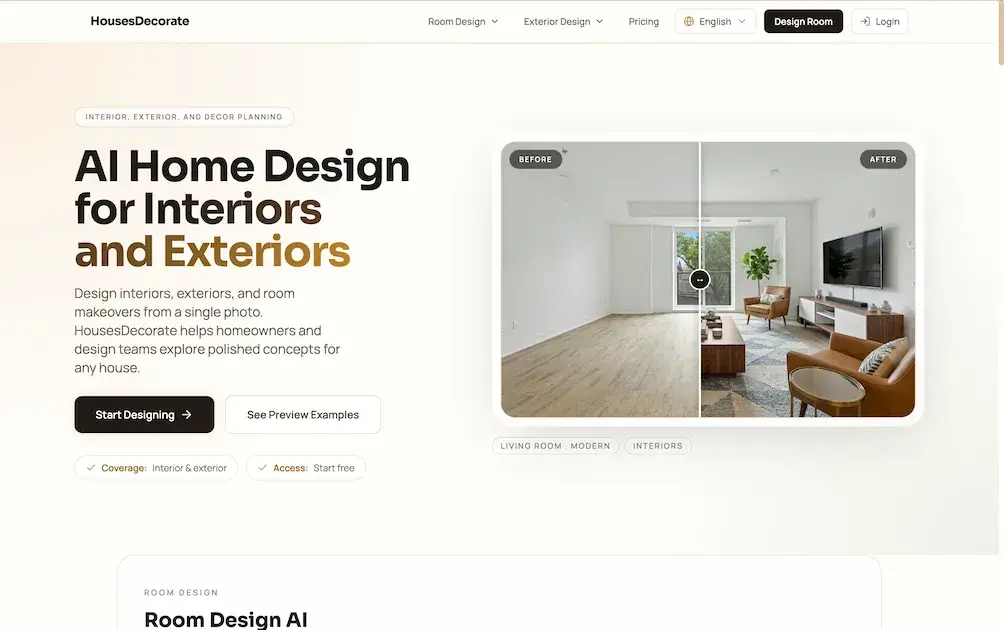
What is HousesDecorate
HousesDecorate is an AI‑driven home‑design platform that generates interior, exterior, and room‑by‑room visual concepts from a single uploaded photograph. Users begin by selecting a style direction—modern, minimalist, Japandi, etc.—and the system produces photorealistic renderings that illustrate layout, color palettes, furniture arrangements, façade treatments, and landscaping options. The workflow supports whole‑home planning as well as targeted makeovers for living rooms, kitchens, bathrooms, bedrooms, offices, and building exteriors, allowing homeowners and design teams to compare multiple concepts before any physical renovation. Fast visual iteration and export‑ready images help align decisions among clients, contractors, or real‑estate stakeholders. A free starter tier provides basic generations, while paid Pro and Premier plans unlock additional credits, faster processing, and commercial‑use licensing.
How does HousesDecorate work
HousesDecorate processes a user‑uploaded photo of an interior or exterior space, then applies AI‑driven design models to generate multiple visual concepts. After the image is uploaded, the user selects a style direction—such as modern, minimalist, or Japandi—and the system synthesizes photorealistic renderings that illustrate altered layouts, color schemes, materials, and furnishings. Each generated concept can be saved, compared, and exported for presentation, enabling homeowners, designers, and contractors to evaluate options before committing to renovations or purchases. The workflow integrates room‑specific presets, fast visual iteration, and a single‑page interface for whole‑home planning.
Benefits of HousesDecorate
HousesDecorate offers an AI‑driven workflow that turns a single photo of any interior or exterior space into multiple, photorealistic design concepts. Users can upload a room or facade, select a stylistic direction (e.g., modern, minimalist, Japandi), and instantly compare layouts, color palettes, furniture arrangements, and material finishes. The platform covers whole‑home planning—from living rooms and kitchens to patios and curb‑appeal facades—while providing room‑specific presets for bedrooms, bathrooms, offices, and more. Fast visual iteration and presentation‑ready results help homeowners and design teams align decisions before committing to renovations or purchases, with a free starter option and scalable credit plans.
Pros and Cons of HousesDecorate
Pros
- Generates photorealistic interior and exterior concepts instantly.
- Covers whole‑home design from rooms to facades.
- Free starter plan allows unlimited uploads.
- Style presets include modern, minimalist, Japandi, etc.
- Export‑ready visuals aid stakeholder communication.
Cons
- Limited credits restrict extensive design iterations.
- Advanced customization only in higher‑tier plans.
- No physical material sourcing or purchasing integration.
- Requires decent internet bandwidth for image uploads.
- Pricing details lack transparent credit‑to‑output ratio.
Core Features of HousesDecorate
AI‑Powered Photo Upload & Design Generation
Users upload interior or exterior photos, select a style direction, and receive polished, photorealistic design concepts within seconds, streamlining early planning decisions.
AI Interior Design (Room‑Specific)
Creates complete interior concepts for living rooms, bedrooms, kitchens, bathrooms, and offices, allowing comparison of layouts, furnishings, and moods before any physical renovation.
AI Exterior Design
Transforms facade images into multiple curb‑appeal options, presenting varied materials, colors, and patio configurations to guide exterior remodeling choices.
Paint Color Visualizer
Enables users to test wall paint colors on uploaded room photos, previewing hues without purchasing samples, thus reducing trial‑and‑error in color selection.
Whole‑Home Planning Workflow
Integrates interior, exterior, and decor modules into a single visual pipeline, supporting room‑by‑room detail while maintaining cohesive design consistency across the entire property.
Presentation‑Ready Visual Output
Generates clean, shareable renderings suitable for clients, contractors, or real‑estate stakeholders, facilitating clear communication and faster decision‑making.
Use Cases of HousesDecorate
- Homeowners: Generate AI‑driven interior and exterior concepts from a single photo to evaluate renovation ideas quickly.
- Real‑estate agents: Produce photorealistic staging visuals for listings, enhancing curb appeal and buyer interest.
- Interior designers: Use room‑specific AI presets to explore layout, lighting, and furniture combinations before finalizing client proposals.
- Contractors: Preview paint colors, facade materials, and fixture selections to align project estimates with visual expectations.
- Architecture students: Practice design workflows by uploading photos and iterating on modern, minimalist, or traditional style directions.
FAQs of HousesDecorate
What is HousesDecorate and how does it use AI for home design?
HousesDecorate is an online platform that leverages artificial intelligence to generate interior and exterior design concepts from a single uploaded photo. Users can select style directions such as modern, minimalist, or Japandi, and the AI produces photorealistic visual drafts that illustrate potential layouts, color schemes, furnishings, and facade treatments without requiring physical renovations or sample purchases.
Which areas of a home can be redesigned with HousesDecorate?
The service covers a complete range of spaces, including living rooms, bedrooms, kitchens, bathrooms, home offices, as well as exterior facades, patios, entryways, and overall curb‑appeal. Each room‑specific tool—like AI Living Room Design or AI Exterior Design—provides tailored presets that help users explore both single‑room refreshes and whole‑home planning within a unified workflow.
How does the workflow of HousesDecorate work from photo upload to final design?
First, users upload a clear interior or exterior photograph. Second, they choose a desired style direction from the available presets. Third, the AI generates multiple design concepts that can be compared, saved, and exported. This iterative process allows homeowners and design teams to visualise options quickly before committing to any physical renovation or purchase.
What pricing options are available and what do the credits include?
HousesDecorate offers a free starter tier that provides limited visual generations. For regular users, the Pro plan supplies 700 credits per month at $19.90, granting standard generation speed and a commercial use license. The Premier plan provides 1,700 credits per month for $49.90, with priority generation speed, advanced style customization, and priority support, making it suitable for professional designers and frequent users.
Can I use the generated designs for commercial projects or share them with contractors?
Yes. Both the Pro and Premier subscriptions include a commercial use license, allowing users to present the AI‑generated visuals to clients, contractors, or real‑estate stakeholders. The designs are production‑ready, high‑resolution images that can be downloaded and incorporated into presentations, marketing materials, or renovation proposals without additional licensing fees.
How to use HousesDecorate
HousesDecorate provides AI‑generated interior, exterior, and decor concepts from a single photo, enabling homeowners and designers to visualize renovation directions before any physical work begins.
Access the platform via Create Design, upload a clear interior or facade image, and confirm the upload to initiate the AI analysis workflow.
Select a style direction—such as modern, minimalist, Japandi, or traditional—from the preset gallery, ensuring the chosen mood aligns with the project goals.
Trigger the generation process; the system produces multiple photorealistic concepts that illustrate layout, color, material, and furniture variations.
Review the visual results on the dashboard, comparing each concept’s spatial arrangement, palette, and fixture choices to assess aesthetic and functional suitability.
Use the built‑in save and export options to download preferred designs, then reference them when discussing options with contractors, suppliers, or stakeholders.
Iterate by uploading alternate photos or adjusting style parameters, allowing rapid refinement of interior or exterior plans until the desired confidence level is reached.
