
Hemingway Editor
Hemingway Editor Plus - Improve Your Writing with AI
| Added on: | Jul 25, 2024 |
| Monthly Visits: | 661.96K |
| Social & Email: | -- |

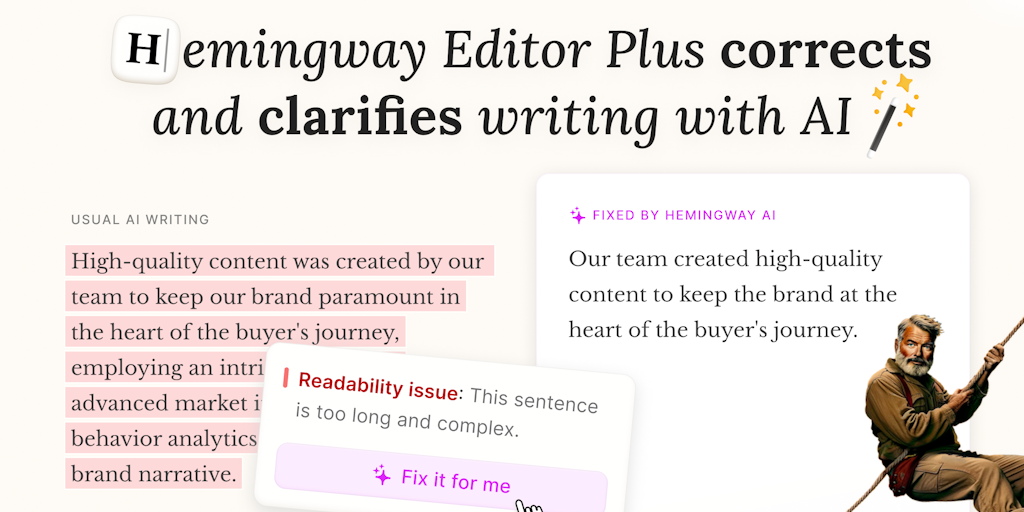
What is Hemingway Editor
Hemingway Editor is a free online writing tool that helps writers improve their prose by identifying and highlighting common writing errors. It is designed for anyone who wants to write more clearly and concisely, especially for those who are writing for a general audience. The tool identifies and highlights sentences that are too long, adverbs, passive voice, and other common writing issues. It can be a helpful tool for students, writers, bloggers, and anyone who wants to improve their writing skills. Hemingway Editor is a great tool for anyone who wants to make their writing more clear and impactful.
How does Hemingway Editor work
Hemingway Editor, available as a desktop app and online, aids writers in improving clarity and conciseness. The core functionality involves highlighting lengthy sentences (yellow), complex sentences (red), weak phrases (blue), and simpler word alternatives (purple) within text. The free version provides this highlighting, while Hemingway Editor Plus, a subscription service, adds AI-powered grammar checking (green highlights), tone adjustment, and automated fixes. This Hemingway Editor Plus service leverages AI to improve writing style and readability, offering a comprehensive writing enhancement toolset including a grammar checker and other AI writing tools. Users can access the desktop application, online editor, and various free online tools such as a grammar checker, paraphrasing tool, and proofreader.
Benefits of Hemingway Editor
Hemingway Editor, available as a desktop app and online, helps improve writing clarity and readability. The Hemingway Editor Plus version offers grammar and tone adjustments, identifying complex sentences and suggesting simpler alternatives. A free two-week trial of Hemingway Editor Plus is available, with no credit card required. This tool is ideal for students seeking to enhance their writing skills, streamlining their writing process and avoiding complex sentence structures. Download Hemingway Editor or try the free online grammar checker today.
Pros and Cons of Hemingway Editor
Pros
- Offline functionality.
- Classic desktop app.
- Improves writing clarity.
Cons
- No AI features (in classic version).
- Paid features for grammar check.
- Limited free trial.
Core Features of Hemingway Editor
Grade Sentences
Hemingway Editor grades your text on a scale of 0 to 4, with 0 being the most easily-readable and 4 being the most complex. This provides a quick assessment of the clarity and conciseness of your writing.
Highlight Issues
It highlights various writing issues in your text, such as:
- Complex sentences: Sentences that are too long and difficult to understand.
- Passive voice: Sentences where the object of the action is the subject (e.g., "The ball was hit by John" instead of "John hit the ball").
- Adverbs: Words that modify verbs or adjectives (e.g., "very," "really," "extremely").
- Weak words: Words that can be replaced with more concise and powerful alternatives.
Suggest Edits
Hemingway Editor provides suggestions for improving your writing by:
- Breaking down long sentences into shorter, clearer ones.
- Changing passive voice sentences to active voice.
- Replacing adverbs with stronger verbs or adjectives.
- Suggesting more concise and impactful language.
Focus on Clarity
This tool helps you improve the clarity and conciseness of your writing by identifying potential issues and offering suggestions for improvement. It aims to make your writing more powerful and engaging for readers.
Use Cases of Hemingway Editor
- Journalists: Improve article clarity and readability using Hemingway Editor's readability scores and concise writing suggestions.
- Students: Enhance essay quality by identifying complex sentences and improving overall writing conciseness with the Hemingway Editor.
- Authors: Refine manuscripts and strengthen writing impact through the Hemingway Editor's analysis of sentence structure and word choice.
- Bloggers: Optimize blog posts for better engagement by utilizing the Hemingway Editor to improve readability and reduce wordiness.
- Business professionals: Create clear and concise business communications with Hemingway Editor, enhancing professionalism and avoiding ambiguity.
FAQs of Hemingway Editor
What is Hemingway Editor?
Hemingway Editor is a free online tool that helps you write clear and concise sentences. It highlights common writing errors, such as passive voice, adverbs, and overly complex sentences.
How do I use Hemingway Editor?
You can paste your text into the Hemingway Editor website or upload a file. The tool will then analyze your text and highlight areas where you can improve your writing.
How does Hemingway Editor help me write better?
Hemingway Editor makes your writing more concise and easier to read. It does this by highlighting things like adverbs, complex sentences, and passive voice, which can make writing seem clunky and confusing. By simplifying your sentences, Hemingway Editor can help your writing pack a punch.
What makes Hemingway Editor different from other writing tools?
Hemingway Editor is unique in that it focuses on the readability of your writing. It doesn't just check for grammar or spelling errors; it also provides suggestions for how to improve the flow and clarity of your writing. Other writing tools might focus on things like grammar or style, but Hemingway Editor helps you write in a way that is clear, concise, and engaging.
How to use Hemingway Editor
- Begin by pasting your text into the Hemingway Editor's text input area. The tool will analyze your writing.
- The Hemingway Editor highlights sentences that are hard to read, complex, or contain adverbs and passive voice.
- Review the highlighted passages and consider rewriting them for improved clarity and conciseness. Focus on readability scores.
- Hemingway Editor Plus offers additional features, such as grammar and spelling checks, enhancing editing capabilities. Consider upgrading for more comprehensive feedback.
- Once revisions are complete, the readability score and other metrics (word count, sentence length) provide insights into writing quality.
Hemingway Editor Website Traffic Analysis
Latest traffic information
- Monthly Visits661.96K
- Bounce Rate69.83%
- Pages Per Visit1.54
- Visit Duration00:01:19
- Global Rank101.41K
- Country/Region Ranking42.93K
Top Keywords
| Keyword | Traffic | Volume | Cost Per Click |
|---|---|---|---|
| hemingway editor | 39.29K | 35.76K | $2.07 |
| hemingway app | 24.78K | 21.82K | $4.12 |
| hemingway | 4.01K | 69.9K | $0.43 |
| hemmingway app | 3.15K | 2.9K | $4.66 |
| readability checker | 2.93K | 10.65K | $1.87 |
Top Regions
| Region | Percentage |
|---|---|
| United States | 47.5% |
| Pakistan | 7.54% |
| India | 7.06% |
| United Kingdom | 5.24% |
| Canada | 2.91% |
Hemingway Editor Alternatives
An uncensored AI story generator for adult fiction writers, with frontier and open models, writer personas, lorebooks and a free community library.
ToneBird is an AI reply assistant that drafts replies in Gmail, Slack and other apps using past conversations, relationship memory and connected documents.
AI-powered IELTS writing checker that scores Task 1 and Task 2 essays against official band descriptors, with inline corrections and detailed reports in seconds.
OutBid provides Upwork freelancers with 60-second Telegram job alerts and AI-written proposals, featuring smart filtering to help apply early and win jobs.

Truessay AI generates academic essays and literature reviews with verifiable citations, supporting multiple citation styles for students and researchers.
QuoteCraft AI generates professional proposals from meeting notes in 60 seconds for freelancers, with AI that learns your style from past proposals.
Appa List is a curated AI apps directory featuring tools for writing, marketing, automation, and productivity to enhance everyday work tasks.
This free online tool provides instant access to thousands of random Bible verses, offering daily inspiration with customizable images and topic filtering for spiritual growth.
SongsAI offers an AI-powered platform for songwriters to generate, rewrite, and edit lyrics in various styles and genres, aiming to inspire creativity.
FlowFiction's AI story generator transforms concepts into complete novels, assisting with outlines, character development, and chapters through human-AI collaboration.
This free AI story generator creates captivating narratives and unique characters instantly, providing inspiration for writers, marketers, and creatives without requiring sign-up.
This platform utilizes Novel AI technology to guide users through web novel creation, from concept development and world-building to character design and chapter drafting.