
AiHubs FAQs
AiHubs is an AI tools directory, helping users find the latest AI applications across various categories to enhance productivity and daily tasks.

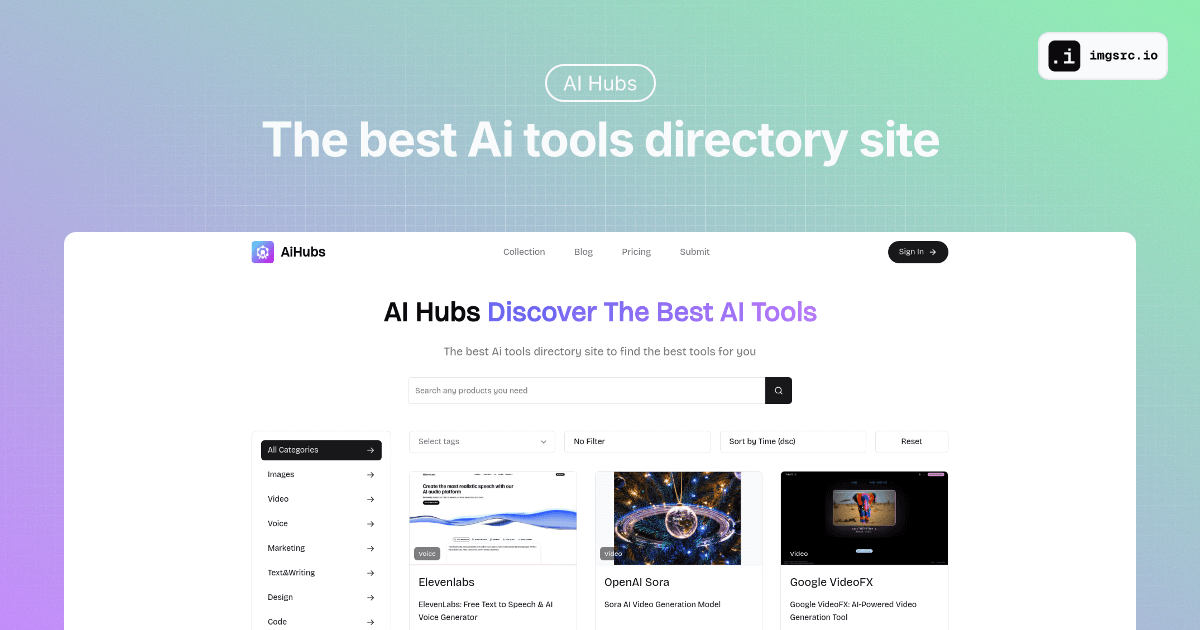
FAQs of AiHubs
What is AiHubs?
AiHubs is an AI tools directory that helps users discover the latest and most powerful AI applications. It serves as a centralized platform to explore various AI tools across numerous categories, facilitating the integration of AI into work and daily life.
What types of AI tools can be found on AiHubs?
AiHubs features a wide array of AI tools categorized for easy navigation. These categories include Images, Video, Voice, Marketing, Text & Writing, Design, Code, Education, Productivity, Music, Lifestyle, Open Source, and Chatbot. Users can find specific tools like AI image generators, AI humanizers, and AI advertising assistants.
How can users find specific AI tools on AiHubs?
Users can locate specific AI tools on AiHubs by utilizing the search bar and filtering options. Tools can be filtered by categories such as Images, Video, or Marketing, and also by relevant tags like "AI Detector" or "Image Generator." The platform also allows sorting by time.
Does AiHubs provide resources beyond a tool directory?
Yes, AiHubs offers additional resources for its users. These include a blog with insights and updates on AI tools, a collection section for curated lists, and a newsletter for weekly updates on the latest AI advancements, helping users stay informed in the rapidly evolving AI landscape.
Can users submit their own AI tools to AiHubs?
AiHubs provides an option for users to submit their AI tools for inclusion in the directory. This feature allows developers and creators to showcase their innovations and contribute to the growing collection of AI applications available on the platform, fostering a collaborative AI community.
What kind of support does AiHubs offer?
AiHubs provides support through an email contact, support@aihubs.ai, for any inquiries or assistance users might require. Additionally, the website includes sections like "Privacy Policy" and "Terms of Service" to address common questions and ensure transparency for its user base regarding AI hubs usage.
How to use AiHubs
AiHubs functions as a comprehensive directory for discovering various AI tools. It assists users in efficiently finding powerful AI applications across numerous categories, thereby streamlining work and enhancing daily life.
- Navigate to the AiHubs homepage at aihubs.ai to begin exploring the extensive AI tools directory.
- Utilize the search bar at the top to find specific AI tools by entering keywords relevant to your needs.
- Filter your search by selecting desired categories, such as "Images," "Video," "Marketing," or "Productivity," from the dropdown menu.
- Further refine your results by applying specific tags, if available, or by adjusting the sorting preference, for example, by "Time (dsc)."
- Click on any listed AI tool, like "Deepname" or "AI Humanizer," to view its detailed description and functionalities.
- Examine the tool's details to understand its purpose, features, and how it can address your specific requirements.
- Subscribe to the AiHubs newsletter by entering your email to receive weekly updates on new AI tools and insights.
- Access additional resources like the "Blog," "Pricing" information, or the "Submit" page for new tools via the navigation menu or footer.
- Use the "Collection," "Category," or "Tag" pages from the footer to browse curated lists or explore tools by classification.
