
Webtrotion
Webtrotion - Notion-based Static Website Generator | Webtrotion Astro Notion CMS
| Added on: | Jul 8, 2024 |
| Monthly Visits: | 645.47M |
| Social & Email: | -- |

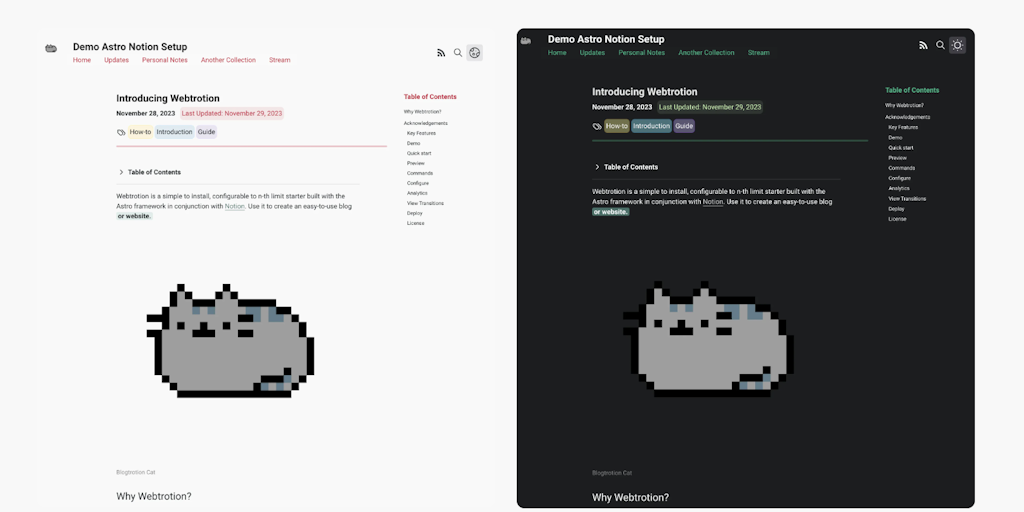
What is Webtrotion
Webtrotion is an open-source framework that allows users to build their own websites using Astro and Notion as a content management system. It's ideal for individuals or teams who want a simple way to create and manage their online presence. Webtrotion leverages the power of Astro's static site generation for speed and performance, while seamlessly integrating with Notion's user-friendly interface for content creation. This combination simplifies the website building process, offering a streamlined approach for managing content and publishing updates. 👍
How does Webtrotion work
Webtrotion is a starter template using Astro and Notion, designed to create websites and blogs. It integrates with Notion as a CMS, reading content and configurations from it. A key feature is single-file configuration, which simplifies customization. The system uses TailwindCSS with Notion color matching and offers dark/light mode options adjustable via a config file. Webtrotion supports features like Satori-generated OG images, RSS feeds, webmentions, and static search. It also implements API request output caching for faster build times.
Benefits of Webtrotion
Webtrotion is a starter built with Astro and Notion, ideal for creating websites or blogs. Integrating directly with Notion, it avoids the need for third-party domains or splitting content. This highly configurable solution offers a single file configuration and TailwindCSS utility classes, with Notion color matching. Key features include accessible HTML, responsive design, SEO-friendliness, and light/dark mode options. Webmention support, Giscus and Bluesky comments, and auto-generated sitemaps enhance user engagement. API request caching on Github Actions ensures fast build times for your webtrotion project.
Pros and Cons of Webtrotion
Pros
- Integrates Notion to create website or blog.
- Single file configuration.
- Has automatic RSS feed with content.
- Uses API caching for faster builds.
- Supports dark and light modes.
Cons
- May require third-party domain or paid tools.
- Split content between Notion and repo.
- Heavy reliance on GitHub.
- Documentation loading errors reported.
- Limited to GitHub site.
Core Features of Webtrotion
Notion Integration
Webtrotion allows users to create a website using content stored in their Notion workspace. This eliminates the need for separate content management systems and streamlines the content creation process.
Astro Framework
Webtrotion uses Astro, a static site generator that's known for its speed and performance. Astro renders pages on the server, making them load quickly and efficiently for users.
Blog Features
Webtrotion provides the capability to create a blog with features like post authoring, category organization, and commenting.
Customizable Themes
Webtrotion offers customizable themes that allow users to tailor the look and feel of their website to match their brand and preferences.
Open Source
Webtrotion is open-source, which means that its code is publicly available and can be modified or extended by developers. This allows users to customize the platform or contribute to its development.
Use Cases of Webtrotion
- Bloggers: Use Webtrotion to build a website and streamline content creation directly from Notion, enhancing webtrition and blog management.
- Website Developers: Implement Webtrotion for rapid website prototyping using Astro and Notion CMS, improving webtrition and deployment workflows.
- Content Creators: Leverage Webtrotion's single file configuration and Notion integration to create SEO-friendly, responsive webtoon-style content.
- Small Businesses: Establish an online presence with Webtrotion, utilizing its cost-effective and configurable Astro-Notion CMS website builder.
- Open Source Enthusiasts: Contribute to and customize the Webtrotion project, extending its features and integrations for wider webtrition adoption.
FAQs of Webtrotion
What is Webtrotion?
Webtrotion is an open-source template that helps you build your own website or blog using Astro and Notion as a content management system (CMS). It uses Astro for its front-end and utilizes Notion as the source of your content, allowing you to write and edit your website directly within Notion.
How do I use Webtrotion?
You can find the source code for Webtrotion on GitHub. To use it, you'll need to clone the repository and set up a few things, like your Notion API key and other configurations. It's quite straightforward, and you can find detailed instructions in the README file within the repository.
What are the benefits of using Webtrotion?
Webtrotion offers a few key advantages:
- Simple Content Management: It allows you to manage your website content directly within Notion, which is user-friendly and familiar to many.
- Fast and Optimized: It's built using Astro, known for its performance and speed.
- Customization: You can customize the template to fit your brand and design preferences.
What kind of websites can I build with Webtrotion?
You can use Webtrotion for a variety of websites and blogs, including personal blogs, business websites, portfolio sites, and more.
How does Webtrotion compare to other website builders?
Webtrotion offers a different approach by utilizing Notion for content management, providing a seamless workflow between content creation and website display. Compared to traditional website builders, it offers a more developer-friendly experience with more flexibility. However, for those who prefer a drag-and-drop interface and are less familiar with code, traditional website builders might be a better fit.
How to use Webtrotion
Webtrotion is a starter website built with Astro and Notion, allowing users to create blogs and full websites. It integrates directly with Notion, using TailwindCSS and CSS variables for customization.
First, deploy the Webtrotion template from the GitHub repository, ensuring you have an Astro environment set up. This action initializes the website.
Configure the
constants-config.jsonfile to customize website settings. This includes TailwindCSS, site metadata, colors, and integration options for personalized control.Connect your Notion workspace by correctly setting up the Notion API integration. Input the Notion API key and database ID into your configuration file.
Create and structure your website content within Notion, utilizing supported blocks for different content types. Structure pages and blog posts inside Notion databases.
Run the local development server using
npm run devto preview your Webtrotion site. Check for layout and content integration issues during development.Customize TailwindCSS classes to match your brand, leveraging Notion color matching capabilities. Edit the Tailwind configuration file for specific adjustments.
Enable features like Giscus or Bluesky comments via configuration to engage with your audience. Configure webmentions to track mentions of your site elsewhere.
Build your static website using
npm run buildfor optimized production files. This process generates the final website ready for deployment.Deploy your static files to hosting providers such as GitHub Pages or Netlify. Automate deployment via GitHub Actions for continuous integration and deployment.
Regularly update your content in Notion; the changes should automatically reflect on the deployed Webtrotion site. Use Github Actions caching for quick rebuilds.
Webtrotion Website Traffic Analysis
Latest traffic information
- Monthly Visits645.47M
- Bounce Rate36.44%
- Pages Per Visit5.69
- Visit Duration00:06:27
- Global Rank45
- Country/Region Ranking77
Top Keywords
| Keyword | Traffic | Volume | Cost Per Click |
|---|---|---|---|
| github | 11.46M | 10.09M | $1.62 |
| github login | 457.62K | 367.17K | $0.5 |
| dlss 5 swapper | 446.36K | 599.34K | -- |
| zapret | 415.51K | 377.14K | $0.86 |
| github desktop | 400.93K | 282.6K | $2.25 |
Top Regions
| Region | Percentage |
|---|---|
| United States | 18.73% |
| China | 11.83% |
| India | 10.32% |
| Russia | 7.84% |
| Germany | 4.15% |
Webtrotion Alternatives
Relay App turns plain-language instructions into AI workflows that connect 200+ apps, run reliable automations, and pause for human approval.

Aurey AI is a browser-based game maker that turns text descriptions into playable games, with version history and community sharing.
MenuForma turns any PDF, photo, or website menu into a digital QR menu with online ordering, 70+ languages, and AI food photos for restaurants.
doany is an AI company builder that builds your product, finds customers, and sells for you. No code, no team needed. You own 100% of the company.
AI website cloner that rebuilds live sites from a URL into editable React + Tailwind. Free preview, multi-page clones, production-ready code export, no subscription.
Build and optimize your online store with Runner AI. Create storefronts by chatting with AI, run automatic tests, and scale conversions with autonomous optimization.
HappySeeds is an AI app building platform that turns ideas into apps with built-in agents, payments, and one-click deployment. Concept to revenue in minutes.
TanStarter is a SaaS boilerplate for developers and indie makers, offering AI‑enhanced auth, payments, database, storage, blog, email, newsletter, dashboard and SEO, all pre‑configured for rapid deployment on Cloudflare Workers at low cost.
VibeBot is an AI-powered Discord bot builder for server owners and community managers, generating custom moderation, music, leveling and AI chat features from plain English prompts and providing instant cloud hosting with zero coding required.
Claw Farm simplifies OpenClaw AI assistant deployment with step-by-step guides, Docker support, and a skills ecosystem for beginners and developers.
GenPPT creates professional presentations from text prompts using AI, offering smart layouts, web search integration, and instant PPTX downloads for business and education.
OneRouter is an enterprise-grade AI router providing a unified API and unified billing system to deploy 200+ LLMs and media models in minutes.