
DescribeAI FAQs
DescribeAI generates AI-optimized product titles, descriptions, SEO keywords, and social media content in six languages, helping e-commerce sellers create multilingual listings efficiently.

FAQs of DescribeAI
How is DescribeAI different from general AI tools like ChatGPT?
DescribeAI specializes in generating product-focused content, whereas ChatGPT is a general conversational AI. DescribeAI produces eight specific content types—titles, descriptions, SEO elements, and social media copy—in six languages with five brand tone options. This specialization ensures optimized outputs for e-commerce listings, not generic text.
Are the translations provided by DescribeAI truly native-quality?
DescribeAI delivers translations that meet native-quality standards, avoiding literal machine translation. The tool generates content in English, Portuguese, Spanish, French, German, and Italian with localized phrasing and cultural nuances, making the copy suitable for each target market.
Can DescribeAI integrate with Shopify, WooCommerce, or Etsy?
DescribeAI currently supports CSV export for bulk importing into Shopify, WooCommerce, Etsy, and other platforms. A direct Shopify integration is planned for the Unlimited plan, enabling automatic description generation when new products are added to your store.
What defines a single "generation" in DescribeAI's pricing?
One generation refers to processing one set of product information to produce all eight content pieces—titles, descriptions, SEO keywords, meta tags, and social media captions. Each generation consumes one credit toward your monthly limit, regardless of how many content types are generated.
Is it possible to cancel a DescribeAI subscription at any time?
Yes, all DescribeAI subscriptions are month-to-month with no long-term contracts. You can cancel anytime through your account settings, and access will continue until the end of the billing period. No cancellation fees apply.
How does DescribeAI optimize content for search engines?
DescribeAI engineers each title and description with SEO best practices, including relevant keyword clusters, meta titles, and meta descriptions. The tool analyzes product details to suggest high-ranking terms, improving visibility on search engines without keyword stuffing.
Can I edit the generated content after exporting it?
All generated content can be copied individually or exported via CSV for further editing. Since the output is plain text, you can modify any piece in a text editor or directly within your e-commerce platform before publishing, ensuring final adjustments match your exact needs.
What is the process for selecting and applying brand tones?
When generating content, you choose one of five brand tones—luxury, casual, professional, playful, or minimal. The AI adjusts vocabulary, sentence structure, and phrasing to reflect that tone consistently across all eight content types, maintaining brand voice uniformity.
How does CSV export facilitate e-commerce platform integration?
The CSV export feature formats all generated content into a structured file compatible with Shopify, WooCommerce, Etsy, and similar platforms. This allows bulk upload of product titles, descriptions, and SEO elements, saving significant time during catalog management.
When is the Shopify integration expected to be released?
Shopify integration is currently in development and will be available exclusively to Unlimited plan subscribers upon release. While no exact date is set, users can expect this feature to automate description generation for new products added to their connected Shopify store.
How to use DescribeAI
DescribeAI is a web-based tool that generates optimized product marketing copy, including titles, descriptions, SEO metadata, and social media content, for e-commerce listings.
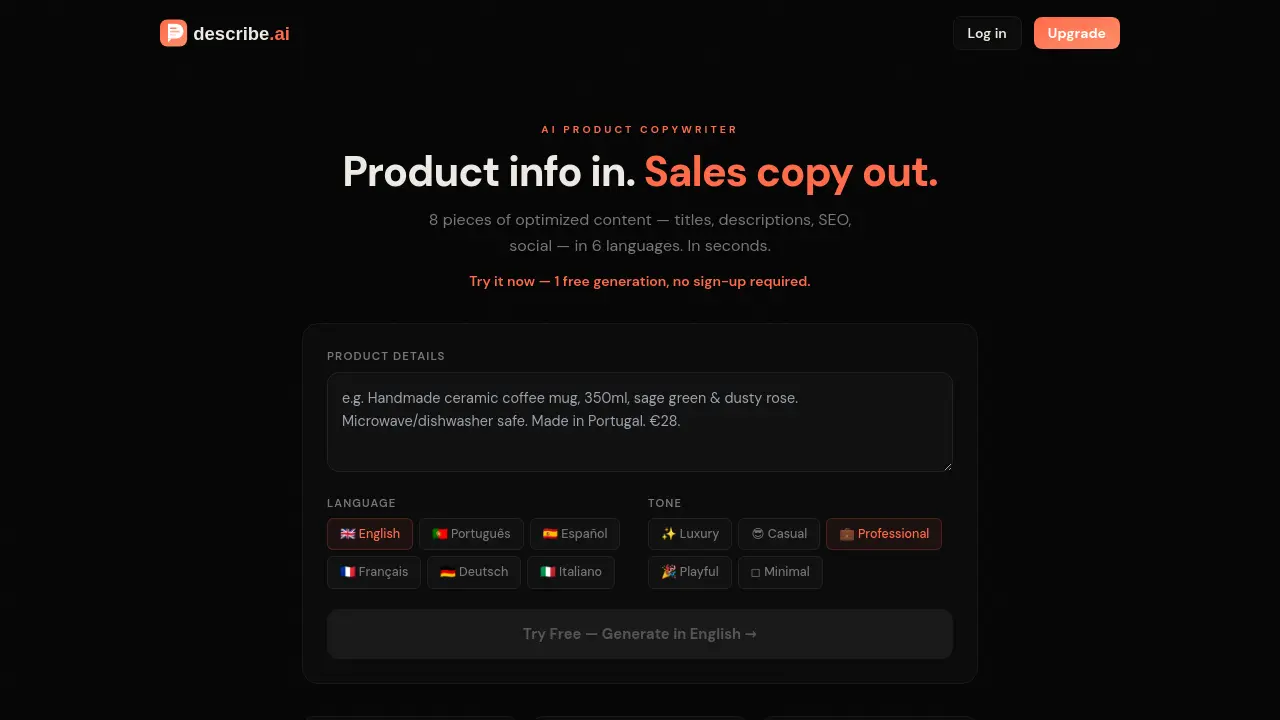
Navigate to the DescribeAI website using a standard web browser. The primary interface features a single input field for product information and selection controls for language and tone.
Enter your product's details into the input box. This can include the product name, a bulleted list of features, materials used, price point, or any available descriptive text.
Select the desired output language from the six available options (English, Portuguese, Spanish, French, German, Italian). Then, choose a brand voice tone from the five provided options.
Click the "Generate Copy in English" or equivalent button to process your request. The system will create eight distinct pieces of content based on your inputs and selected parameters.
Review the generated output displayed on the page. The content is organized by type, such as product title, long description, SEO keywords, meta tags, and social media captions.
Use the "Copy" buttons adjacent to each content block to copy individual items to your clipboard. Alternatively, use the export function to download a CSV file containing all generated copy.
Analyze the SEO keywords and meta descriptions provided. Integrate these directly into your e-commerce platform's backend to improve search engine visibility for the product listing.
For bulk product listings, iterate this process for each product. Use the CSV export feature to efficiently organize generated content for bulk import into platforms like Shopify or WooCommerce.
If the initial output does not meet requirements, adjust your input product details for clarity or specificity, then regenerate. Paid plans offer a history feature to review past generations.
