
Yes or No Wheel
Yes or No Wheel: Instant Decision-Making Tool
| Added on: | Jul 27, 2025 |
| Monthly Visits: | -- |
| Social & Email: | -- |

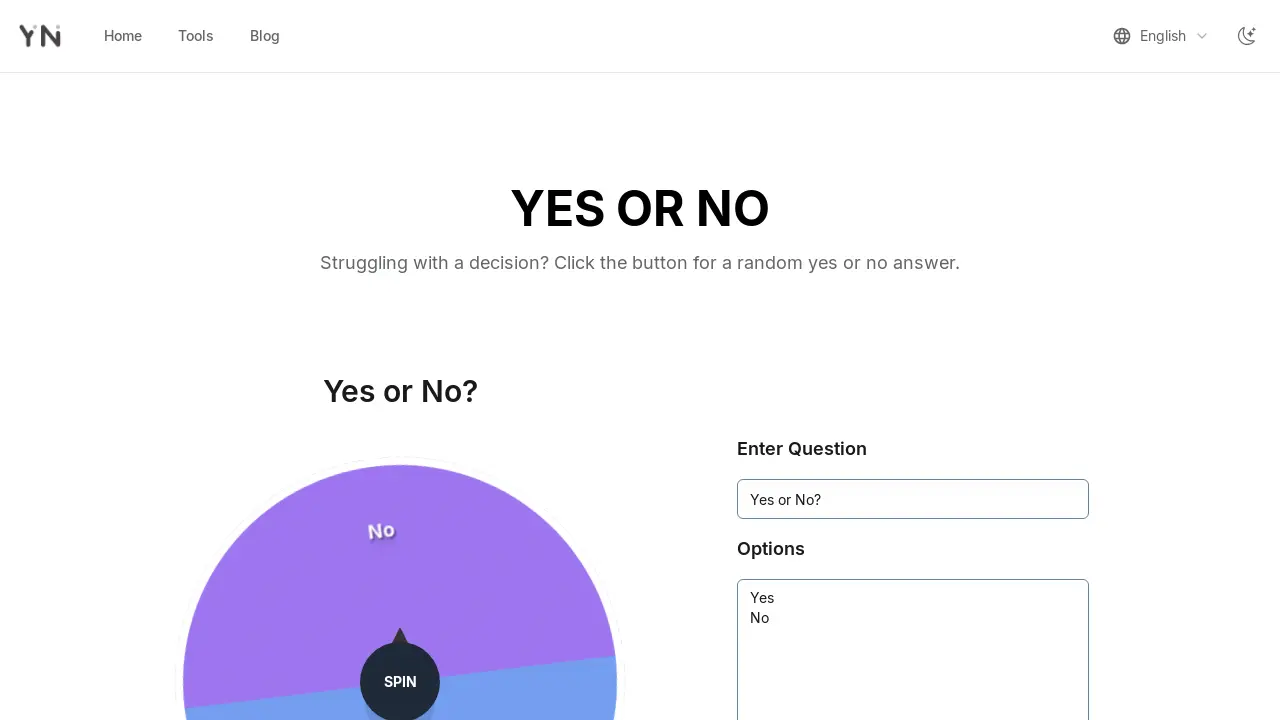
What is Yes or No Wheel
The Yes or No Wheel is an online decision-making tool designed to provide instant answers. This customizable spinner allows users to input various options beyond just "Yes" or "No," enabling applications for diverse scenarios such as games, raffles, or general choices. It features a responsive design for multi-platform access and utilizes true randomization algorithms to ensure unbiased results. The tool prioritizes user privacy by not storing any input data, making it a secure and convenient option for quick decision-making.
How does Yes or No Wheel work
The Yes or No Wheel operates as an online decision-making tool, allowing users to input custom options or utilize the default "Yes" and "No" choices. Users interact by entering their desired answers into a text box, with each option on a new line. Subsequently, clicking a "spin" button activates a simulated wheel spinner, which employs a true randomization algorithm to select one of the provided inputs. The wheel then stops on the chosen outcome, providing an instant answer. This tool is accessible across multiple platforms and requires no downloads or user data storage, ensuring privacy and convenience for various decision-making scenarios, including those beyond simple "yes" or "no" queries.
Benefits of Yes or No Wheel
The Yes or No Wheel offers a free, online tool for instant decision-making, providing random results for various choices. This customizable yes or no wheel allows users to input any options, not just "yes" or "no," making it suitable for games, creative prompts, or breaking deadlocks. It functions across multiple platforms, ensures data security by not storing user information, and promotes effortless decision-making without downloads or registration. Users can spin the wheel to decide everyday dilemmas or incorporate it into party games.
Pros and Cons of Yes or No Wheel
Pros
- Completely free to use.
- No registration required.
- Supports multiple platforms.
- Customizable options available.
- Ensures random, unbiased results.
Cons
- Lacks advanced features.
- Requires internet access.
- No user data is stored.
Core Features of Yes or No Wheel
Random Decision Generation
Provides immediate "Yes" or "No" answers to user-posed questions, aiding in quick decision-making and overcoming hesitation effectively.
Customizable Input Options
Allows users to define custom options beyond "Yes" or "No," enabling use for various scenarios like name selection or creative prompts.
Data Privacy and Security
Ensures no user data is stored, with all inputs processed locally and cleared upon page closure, guaranteeing complete privacy and security.
Use Cases of Yes or No Wheel
- Individuals: Utilize the Yes or No Wheel to simplify everyday decisions and overcome decision paralysis.
- Friends: Employ the yes or no wheel spinner for interactive party games and resolving group deadlocks.
- Creators: Leverage the Yes or No Wheel for creative prompts, sparking new ideas for writing or design.
- Users: Customize the yes or no wheel input with custom options for various decision-making scenarios, beyond just yes/no.
FAQs of Yes or No Wheel
What is the purpose of the Yes or No wheel?
The Yes or No wheel is primarily designed as a decision-making tool. It provides a randomized "Yes" or "No" answer to assist users in resolving simple dilemmas or making choices when they are undecided, aiming to alleviate decision paralysis.
Does the Yes or No Wheel store any data?
No, the Yes or No Wheel does not store any user data. All inputs are processed locally on the user's device and are automatically cleared when the page is closed, ensuring user privacy and data security.
In what scenarios can the Yes or No Wheel be used?
The Yes or No Wheel is suitable for various light decision-making scenarios, such as everyday choices like deciding whether to go to the gym or attend a social gathering, or even for selecting meal options. Its flexibility extends to numerous personal and group situations.
Can I only choose 'Yes' or 'No' on the wheel?
No, the Yes or No Wheel is not limited to only "Yes" or "No" options. Users can customize the content by entering various options, making it suitable for lotteries, games, or selecting winners from a list of names, offering versatile utility beyond simple binary choices.
How do I customize options in the Yes or No wheel?
To customize options, users should enter their desired content into the input box located on the right side of the wheel. Each option should be on a new line by pressing Enter. The changes will be immediately reflected on the wheel for spinning.
Are the results of the Yes or No wheel random?
Yes, the results generated by the Yes or No wheel are entirely random. The tool utilizes true randomization algorithms to ensure that every spin result is fair and unbiased, allowing fate to determine the outcome.
Is the Yes or No Wheel accessible across multiple platforms?
The Yes or No Wheel offers multi-platform support, ensuring perfect compatibility with mobile phones, computers, tablets, and various other devices. Its responsive design allows it to function smoothly across different screen sizes, providing consistent usability.
What are some fun ways to use the Yes or No Wheel?
Beyond everyday decisions, the Yes or No Wheel can be utilized for party games like "20 Questions," to break deadlocks among friends regarding choices such as movie nights or restaurant selections, and as a creative prompt tool for writers or designers seeking new ideas or plot twists.
How to use Yes or No Wheel
The Yes or No Wheel serves as an accessible online tool designed to facilitate immediate decision-making. It operates by generating random "yes" or "no" responses, assisting users in resolving simple choices or custom queries. This versatile "yes or no wheel spinner" can also be customized with various inputs, expanding its utility beyond binary outcomes, functioning as a "yes or no wheel picker" or "yes or no wheel generator."
- To begin, navigate to the Yes or No Wheel website.
- Formulate the question requiring a decision mentally or verbally.
- Locate the "Options" input box on the right side of the interface.
- Input your desired options into the box; for a standard "yes or no wheel decide," ensure "Yes" and "No" are present.
- To add custom options beyond "Yes" or "No," type each new option on a separate line.
- Initiate the spin by clicking the "Spin" button situated at the wheel's center or below the input box.
- Observe the "yes or no wheel spin" as it rotates, randomly selecting one of the provided options.
- The wheel will stop on a definitive answer, offering a clear response to your posed question.
- For a new decision or to re-spin, click the "Reset" button to clear the previous result and options.
- Users can trust the "yes or no wheel accurate" results, as the tool employs true randomization algorithms, ensuring an unbiased outcome for every spin.
