
Archivist FAQs
Archivist is an AI-powered search engine and assistant that helps you search through and understand your codebase blazingly fast. It automatically updates as you write code and aims to help developers focus on coding without having to delve through mountains of code.

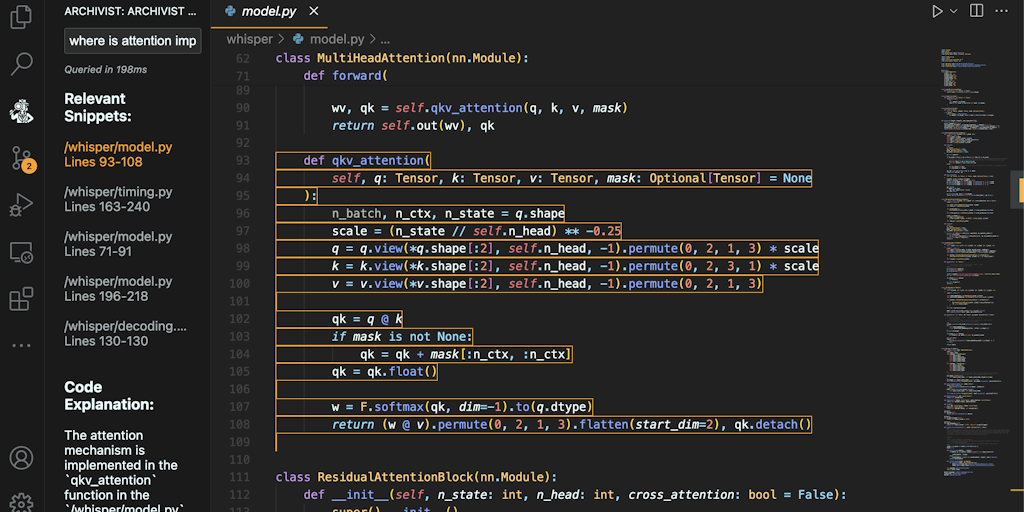
FAQs of Archivist
What is Archivist?
Archivist is a Visual Studio Code extension that uses AI to help you find what you need in your codebase. It helps you find the code you are looking for quickly and easily by searching based on the meaning of your query, rather than just the exact words you type in.
How does Archivist work?
Archivist uses AI to understand the meaning of your search query and then searches your codebase for relevant results. This means you can use natural language to search for things like "the function that handles user authentication" or "the code that calculates the total price" and Archivist will find the code you are looking for.
What are the benefits of using Archivist?
- Archivist is blazingly fast. It can search through large codebases in seconds, making it easy to find what you need quickly.
- Archivist is accurate. It uses AI to understand the meaning of your search query, so it is less likely to return irrelevant results.
- Archivist is easy to use. It has a simple and intuitive interface that makes it easy to get started.
How do I install Archivist?
You can install Archivist from the Visual Studio Marketplace. Once it's installed, you can access it by searching for code within VS Code, or by using the command palette (Ctrl+Shift+P or Cmd+Shift+P). You can use the command Archivist: Search to begin searching.
How does Archivist compare to other code search tools?
Archivist is different from other code search tools because it uses AI to understand the meaning of your search query. This makes it more accurate and efficient than tools that rely on keyword matching.
What types of codebases does Archivist support?
Archivist works with many popular languages, including Python, JavaScript, TypeScript, Java, C#, C++, Go, and more.
Does Archivist require any specific hardware or software requirements?
Archivist is lightweight and doesn't require a lot of resources. It works on Windows, macOS, and Linux.
Can I use Archivist with multiple codebases?
Yes, Archivist can be used with multiple codebases. You can switch between codebases using the dropdown menu in the Archivist interface.
What if I have a problem with Archivist?
If you encounter any problems, you can consult the official documentation or visit the Archivist repository on GitHub for help.
